

MANAGE WINDOWS UPDATES

Script your Windows Patches

Get full control over your update process

With WuInstall, you can update your systems from command line and patch using your own scripts, whenever you like with lots of options for experienced system administrators.

WuInstall

Manage Windows Updates

WuInstall is a command line tool that makes it possible to install Windows Updates on demand. This gives you full control over the patching process. You decide what patches should be applied when and on which machine.


Depending on the System configuration it uses either the internal WSUS server or the external Microsoft Update Server to look for available updates. Afterwards, those can be downloaded and installed.


WuInstall was first released in 2009 and today it is used by ten thousand companies all over the world; amongst them are a lot of big enterprises across all industries and public institutions.

Integration and Flexibility

WuInstall is a command line tool and can therefore be used in combination with any other tool like SCCM and integrated in the workflow. For example, it can be run in a shutdown script to install updates when users do not need the machine.

Scheduling

You decide when to look for updates and if you want to download and install them. Product names and regular expression can be used to find specific patches. You can even download anc cache updates and install them later offline later.

With or without WSUS

WuInstall works seamlessly with WSUS - however, If you want to check for the availability of a certain patch, which has not yet been downloaded to your WSUS server, it comes in handy to be able with WuInstall to temporarily bypass WSUS.

Login or shutdown script

With WuInstall updates will be installed whenever a shutdown is initiated, therefore users are not disturbed anymore by annoying reboot requests during work.


Information and documentation

The installation progress can be displayed and time limits for the installation of the updates can be set. In addition to it, log files for all processes are available.

Rebootcycle

WuInstall is able to install all available windows updates until a reboot is necessary and continues with the installation afterwards -> automated reboots during windows updates.

... use it as a standalone tool or in combination with WSUS or other system management tools.

... manage a small network with 10 machines as well as huge network with thousands of clients or servers.

Sounds great for you?

So what are you waiting for?

get it. run it. profit.

BUT WAIT ...

what about the costs?

Don't worry! Our pricing is very flexible and adapts to your needs. For Basic (up to 100 machines) to Enterprise (up to 4000 machines) and Individual (over 4000 machines) - you only pay for what you actually need.
Learn more!

Still in doubt?

See what satisfied Customers say about WuInstall

You've nothing to lose

Try WuInstall for 30 days completely for free and convince yourself.

Immediately after signing up, you will receive a message with the download link and your access data to the portal. Please also check your spam folder. Enjoy!

ANY QUESTIONS?

CONTACT US!

Willroiderstraße 3, 9500 Villach, Austria
support@wuinstall.com
+43 720 505 765
0043-720-505765 9

More info

You need more than a command line tool?

XEOX is our cloud-based RMM which includes all WuInstall features.


Getting started with WuInstall

WuInstall is a Windows command line tool that enables IT Administrators to script Windows updates. It makes the entire updating process more controlled and user friendly by enabling admins to enforce the query, download and installation of Windows Updates at times when it makes sense. The possibilities you have with WuInstall are huge, you can use it as a standalone tool or in combination with WSUS or other system management tools, you can manage a small network with 10 machines as well as huge networks with thousands of clients or servers.

Typical use cases for WuInstall are for example patching office clients at night time with a pre-defined set of update or servers at a certain maintenance window. Many times, WuInstal is used in combination with psexec in order to remotely patch machines.

1. Download and Install WuInstall

You can get WuInstall from the website http://www.wuinstall.com - there is a free, full functional 30 day trial where you can test whether WuInstall fits your IT infrastructure. After that, you can purchase your WuInstall version either online with credit card or contact us if you like to purchase via PO. Details see in our FAQ

There might be a free version of WuInstall with just the basic features at some point in the future, but right now we are focusing on the commercial version with advanced features.

Just download the zip files and unzip it - the only file you need is WuInstall.exe, there is no further installation of anything required, it is just a lightweight exe file you can call from any location.

There are three basic function of WuInstall: searching for updates, downloading updates and installing updates, with the options /search, /download, /install - each WuInstall call needs to contain - among other possible options - exactly one of those three options to make sense.

2. Search for Updates

A simple search is triggered via

wuInstall / search

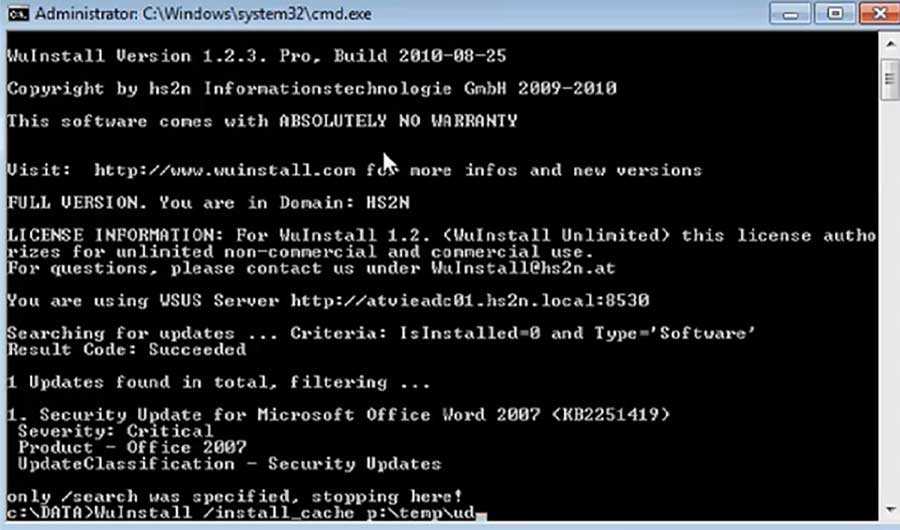
It searches for all Microsoft Updates that are available for install on the current machine (Windows, Office, ...) - in quite the same way you would also see it in the update menu of the Windows OS - and lists them on stdout. Doing just a search has no effect on the machine and is mostly for automated or manual checking  which updates are available and for testing your scripts.

Of course, not always every update is welcome to install - there are many options to filter the search and include / exclude certain updates by name or KB number, also there is an option to write the result of the search including all information about the updates in an xml file - this can be very helpful when interacting with other software tools or custom scripts.

On this page:

3. Download Updates

A download of updates is triggered via

wuInstall /download

It first does a search and downloads every update of the result list to the local cache of the machine. Those updates are now ready to be installed when ever it is appropriate with the /install option. If /download is triggered on an update that is already downloaded, nothing is done. The /download option can be used to download pending updates at times when bandwidth is available.

4. Install Updates

To install updates, use the option

wuInstall /install

It does a search first, then triggers a download for the updates (if they have not been downloaded already) in the result list and then installs the updates on the system. There are a few options like /quiet, /disableprompt or /autoaccepteula in order to suppress user interaction and make installations unattended. Updates can also be installed over reboots using the /rebootcycle option.

5. External Resources

You can also find some information about possible WuInstall use cases under the following links:

Remotely Install Windows Updates – A How To Guide: http://techthoughts.info/remotely-install-windows-updates/

Bypass WSUS to install Windows updates - http://rajdude.com/blog/bypass-wsus-to-install-windows-updates/

Dealing with the hell that is running Windows Update on a freshly installed machine - http://automatica.com.au/2012/07/dealing-with-the-hell-that-is-running-windows-update-on-a-freshly-installed-machine/

Patch Management with Windows Update Server and WuInstall - https://deangrant.wordpress.com/2013/09/24/patch-management-with-windows-update-server-and-wuinstall/

WuInstall – Push Windows updates to clients from a central cache - https://4sysops.com/archives/wuinstall-push-windows-updates-to-clients-from-a-central-cache/

Windows update command – Script updates with WuInstall 2.0 - https://4sysops.com/archives/windows-update-command-script-updates-with-wuinstall-2-0/

Manage automatic updates from the command line - http://www.intelliadmin.com/index.php/2012/10/manage-automatic-updates-from-the-command-line/

Windows Updates mittels WuInstall automatisieren (German) - http://www.lob-services.de/2010/03/windows-updates-mittels-wuinstall-automatisieren/