Deutsch (DE-CH-AT)English (United Kingdom)

Download

Help & Support


WuInstall Download
Pro

Download

get full version

1.1 Free
Documentation

License information: WuInstall 1.1. is freeware. For detailled infos about WuInstall 1.2. Pro pricing, please use our license calculator. See also WuInstall Pro License agreement

Facebook Badge

WuInstall PRO

Benefits of the Extended Version WuInstall 1.2. PRO

WuInstall 1.3.4 PRO contains all features of the Freeware Version 1.1. and several more. The main benefit of WuInstall 1.2 Pro is that you can filter the list of available updates and decide what kind of updates you want to install. In addition, you can search within the updates using regular expressions. You are able to see the installation status and you can temporarily bypass WSUS.

Furthermore the latest version contains some new features like the rebootcycle. The rebootcycle option can completely automate reboots during the update process. That means WuInstall is now able to install all available windows updates until a reboot is necessary and continues the installation process after the reboot right away. The entire process is recorded in log files which are also available as XML output.

You can find more information about all available features in the table below, at the HowTos and the new WuInstall Documentation.


Basic Options
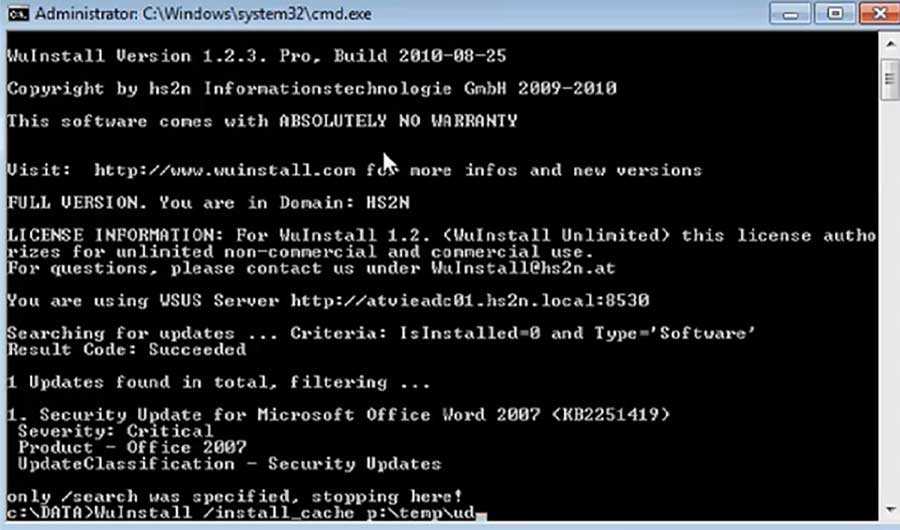
/search Lists all update which are available. It either searches on the Windows Update Server in the Internet, or, if configured, on your WSUS. It has no impact on your system at all, it just does a search ans lists what was found.
/download Does the same search as WuInstall /search and then downloads the updates which were found. WuInstall itself does not download anything, but it triggers the Microsoft Windwos Update Engine, which downloads the updates.
/download_to_directory It does almost exactly the same as /download, but furthermore this option copies the updates to the specified directory, usually in msi or exe format. These updates can be installed manually afterwards.
/install This option first executes exactly the same as /download (=searching and downloading updates) and then starts installing the downloaded updates.
uninstall The /uninstall option automatically searches for already installed updates offline (see /offline option) with the criteria "IsInstalled=1" and uninstalls them. All filter options (e.g. /match, /product, /severity, ...) are available to specifically select updates to be uninstalled.

Reboot / Shutdown Options
/reboot [nseconds] This option initiates a system reboot with a delay of the specified number of seconds (nseconds) after the execution of WuInstall. If no time is specified, 10 seconds are used by default.
/reboot_if_needed[nseconds] Does exactly the same as /reboot, the only difference is that a reboot is triggered only when a reboot is required (when it exits with a return code 1 or 11).
/rebootcycle[ntimes] With the /rebootcycle option it is possible to install updates with several reboots in between. After a successful update and reboot, WuInstall starts and executes the previous command again.
/reboot_force Forces a reboot after executing WuInstall after nseconds (or default 10) seconds, it does not matter if a reboot is needed or not. Open programms are forced to be closed.
/shutdown[nseconds] /shutdown is similar to /reboot, but instead of rebooting the system, it shuts down. The default number of the the delay seconds is 10, and the shutdown is done in ANY CASE, regardless the result of WuInstall.

Caching Options
/install_cache cache_dir This feature uses a shared cache directory to prevent machines in a local network from downloading updates more than once.
/download_cache cache_dir This option does the same as /install_cache, but only downloads the updates, without installing them (which can be used for example to populate the cache with updates, without installing them).
/nocachedel In combination with /install_cache or /download_cache: does not clear the cache directory on error.

Criteria Options
/criteria “query string” Specifies the criteria with which the updates are searched on the server (Windows Update Site or WSUS). If no criteria is specified, WuInstall searches by default for software (no drivers!) which has not yet been installed. So the default criteria is: IsInstalled=0 and Type='Driver'.
/driveronly Searches only for drivers which have not yet been installed. Equivalent to the criteria (IsInstalled=0 and Type='Driver').
/includedriver Searches for software and drivers which have not yet been installed. Equivalent to criteria (Type='Software' and IsInstalled=0) or (Type='Driver' and IsInstalled=0).
/alltypes Searches for all types of updates which have not yet been installed. Equivalent to criteria (IsInstalled=0).

Filter Options
/classification update_classification Each update has a certain classification. It is possible to filter results of a search (which match the specified criteria) by classifications: Crtical Updates, Updates, Update Rollups, Security Updates, Service Packs, Feature Packs, Definition Updates
/severity severity_level Each security update has a certain severity level. It is possible to filter results of a search (which match the specified criteria) by severity levels: Critical, important, moderate, low, unknown
/product “product_name” Each update belongs to a product (for example Office 2007, Windows 7, Forefront Client Security, ...). It is also possible to filter results of a search (which match the specified criteria) by a product name. No wildcards are possible, the product name has to be an exact match. Currently, you can only filter one product.
/match “regexp” This option filters each update in the result list if the title of an update matches the search string specified with the regexp parameter (in WuInstall Pro, also regular expressions are possible).
/nomatch “regex” This is quite the opposite of the /match option: it filters out all the updates that do match the regular expression and displays the rest (=the updates which do NOT match). Obviously it is very useful for excluding certain updates.
/match file With the /matchfile option you can specify multiple /match parameters. Just write the desired update matches (regular expressions are supported) into a file and specify this file as the matchfile..
/nomatchfile file /nomatchfile is quite the opposite of the /matchfile option: use it if you want to specify multiple /nomatch paramters (if you want to exclude a list of updates). WuInstall lists all the updates in the result list, which match NONE of the lines in the file.
/isdownloaded 1 |0 This options filters updates which have already been downloaded to the local cache.

WSUS Options
/bypass_wsus The bypass_wsus option bypasses any configured WSUS and forces WuInstall to access the Windows Update site. If a WSUS is configured, WuInstall changes the registry key HKEY_LOCAL_MACHINE\SOFTWARE\Policies\Microsoft\Windows\WindowsUpdate\AU, Value UseWuServer from 1 to 0, which means that no WSUS should be used.
/use_wsus wsus_address The /use_wsus option works similar to the /bypass_wsus option, but you can specifiy another WSUS which is valid during the execution of WuInstall (or it allows you to switch from no WSUS at all to a certain WSUS).
/use_mu_on_error When an error occurs trying to install an update using WSUS, WuInstall automatically tries again to install the updates bypassing the WSUS.

Other Options
/autoaccepteula For some updates, an EULA (End-User License Agreement) has to be accepted by the user. With the option /autoaccepteula, all EULAs are accepted automatically before installing.So the update installation works without any user interaction, the process can be completely unattended. This works only when WuInstall is called by an Administrator or a power user account.
/logfile file-to-log This options logs the console output of WuInstall to the specified logfile (each output line also contains the current timestamp).
/logfile_append file-to-log The option /logfile_append is similar to /logfile with the difference that the entries are appended at the end of the specified file, instead of creating a new file.
/maxruntime minutes This option starts a timer with the specified number of minutes at the start of WuInstall and exits WuInstall (if it is not finished until the timer expires) with exit code 12. It exits at any case, no matter how far the execution of WuInstall is.
/simple_error With this option, WuInstall returns 0 for any success and 1 for any error, regardless of the reason.
/show_progress This option shows the progress for the download of every single update and the installation of the updates, using asynchronous downloads / installation.On some machines under certain circumstances, the /show_progress option might cause problems, so use it only when manually testing scripts or searching for problems on a single workstation. It is not advised to use it in automated scripts on different workstations. This feature is not recommended for the productive use of WuInstall!
/offline This options makes WuInstall NOT connecting to the WSUS Server or Microsoft Update site when searching updates, instead it searches offline. This option is quite useful for searching already installed updates. The criteria "IsInstalled=1" and the /uninstall option automatically trigger an offline search.
/quiet The update-installer is forced to do an installation without user interaction.
/disableprompt Disable showing source prompts to a user when installing the updates.
/silent Surpresses any console output (logfile option is still working).
/donothing [retcode] WuInstall takes no action and returns the specified retcode, 0 by default.
/xmlout file Writes an XML report to the specified file. This file contains additional information about the machine.
/disable_winhttp_proxy Disables the winhttp Proxy. Therefore WuInstall deletes the registry key HKEY_LOCAL_MACHINE\SOFTWARE\Microsoft\Windows\CurrentVersion\Internet Settings\Connections. After execution WUInstall enableds the Proxy again.
/disable_internet_proxy Disables the winhttp Proxy. Therefore WuInstall deletes the registry key HKEY_LOCAL_MACHINE\SOFTWARE\Microsoft\Windows\CurrentVersion\Internet Settings\Connections. After execution WUInstall enableds the Proxy again.
/includeRecommendedUpdates Includes recommended and optional updates.
/disable_ie_firstruncustomize Disables the internet explorer 8 set up dialog.


All commands: WuInstall at a glance (PDF)
Further information: WuInstall Documentation


Pricing / License

For detailled infos about WuInstall 1.2. Pro pricing, please use our license calculator.
See also WuInstall Pro License Agreement

For questions please check the FAQ or contact us under contact This e-mail address is being protected from spambots. You need JavaScript enabled to view it , please also drop us a mail for comments, bug reports and feature requests


Download:

Version Download
WuInstall 1.2 PRO

download trial

get full version